WAF & Shield — Web ACL設計・Bot対策・DDoS防御
WAFルール設計、マネージドルール、Bot Control、Shield Advanced、Firewall Managerの集中管理を徹底解説
はじめに
AWS WAFとShieldは、アプリケーション層(L7)とネットワーク層(L4)の脅威から保護する統合的なセキュリティソリューションです。本講では、実務で問われる詳細な設定、制約条件、ベストプラクティスを掘り深く解説します。
試験では単なる「何ができるか」ではなく、「どのような要件に対してどのルール構成を組むか」「何ができないのか」という実装面での判断が問われます。
WAF ルール評価順序と Web ACL フロー
Loading diagram...
DDoS 防御レイヤー(Shield Standard → Advanced → WAF → CloudFront)
Loading diagram...
WAF Web ACL マネジメントコンソール画面
1. AWS WAFの概要と処理フロー
1.1 WAFの位置付けと対応リソース
AWS WAFはL7(アプリケーション層)のファイアウォール。以下のリソースに関連付けられます:
| リソース種別 | 説明 | WAF対応 |
|---|---|---|
| CloudFront Distribution | CDN | ✓ |
| Application Load Balancer (ALB) | L7ロードバランサー | ✓ |
| Network Load Balancer (NLB) | L4ロードバランサー | ✗(Shieldのみ対応) |
| API Gateway | RESTful/HTTPエンドポイント | ✓ |
| AppSync | GraphQL API | ✓ |
| AWS Global Accelerator | グローバルトラフィック最適化 | ✗(Shieldのみ対応) |
| Cognito User Pool | ユーザー認証 | ✗ |
制約: WAFが対応していないリソース(NLBのDDoS対策が必要な場合)はShield Advanced + Firewall Managerで別途対応。
1.2 WAFの処理フロー
クライアントリクエスト
    ↓
┌─────────────────────────────────────┐
│  Web ACL評価(ルール順序で処行)     │
│  1. ルール1~ルールNを検査           │
│  2. デフォルトアクション実行        │
└─────────────────────────────────────┘
    ↓
  Allow  → リソースにフォワード
  Block  → HTTP 403応答
  Count  → ログ記録のみ
  CAPTCHA → チャレンジ表示
Challenge → 同上(古いアクション)重要: ルールは上から順番に評価されます。最初にマッチしたルールのアクションが実行され、それ以降のルールは評価されません。
2. Web ACLの詳細設計
2.1 Web ACLの基本構造
{
  "Name": "MyWebACL",
  "Scope": "REGIONAL",  // または "CLOUDFRONT"
  "DefaultAction": {
    "Allow": {}  // またはBlock
  },
  "Rules": [
    {
      "Name": "RateLimitRule",
      "Priority": 0,
      "Statement": { /* ルール定義 */ },
      "Action": { "Block": {} },
      "VisibilityConfig": {
        "SampledRequestsEnabled": true,
        "CloudWatchMetricsEnabled": true,
        "MetricName": "RateLimitRule"
      }
    }
  ],
  "VisibilityConfig": {
    "SampledRequestsEnabled": true,
    "CloudWatchMetricsEnabled": true,
    "MetricName": "MyWebACL"
  }
}ポイント:
Scope: REGIONAL(ALB/API GW用)またはCLOUDFRONT(CF用)DefaultAction: どのルールにもマッチしなかった場合のアクションPriority: 0から順に評価。値は連続していなくても良い(推奨: 0, 10, 20…で管理性向上)
2.2 ルール定義の3パターン
パターン1: マネージドルール(推奨)
AWSが提供し、継続的に更新されるルール群。
{
  "Name": "AWSManagedRulesCommonRuleSet",
  "Priority": 0,
  "OverrideAction": {
    "None": {}  // またはCount
  },
  "Statement": {
    "ManagedRuleGroupStatement": {
      "VendorName": "AWS",
      "Name": "AWSManagedRulesCommonRuleSet",
      "ExcludedRules": [
        {
          "Name": "SizeRestrictions_BODY"  // 特定ルールを除外
        }
      ],
      "RuleActionOverrides": [
        {
          "Name": "GenericRFI_BODY",
          "ActionToUse": {
            "Count": {}  // 特定ルールをCount実行(デバッグ用)
          }
        }
      ]
    }
  },
  "VisibilityConfig": {
    "SampledRequestsEnabled": true,
    "CloudWatchMetricsEnabled": true,
    "MetricName": "AWSManagedRulesCommonRuleSet"
  }
}主要なAWSマネージドルールグループ:
- AWSManagedRulesCommonRuleSet: SQLi、XSS、ファイルインジェクション対策
- AWSManagedRulesKnownBadInputsRuleSet: 既知の悪い入力パターン
- AWSManagedRulesAmazonIpReputationList: Amazon脅威インテリジェンス
- AWSManagedRulesAnonymousIPList: プロキシ/VPN検出
- AWSManagedRulesBotControlRuleSet: ボット検出(後述)
- AWSManagedRulesLinuxRuleSet: Linuxターゲット攻撃
- AWSManagedRulesPHPRuleSet: PHPアプリ固有攻撃
パターン2: カスタムルール(柔軟性重視)
{
  "Name": "BlockSQLInjection",
  "Priority": 1,
  "Statement": {
    "SqliMatchStatement": {
      "FieldToMatch": {
        "Body": {
          "OversizeHandling": "MATCH"  // 大きなボディはマッチ扱い
        }
      },
      "TextTransformation": [
        {
          "Priority": 0,
          "Type": "URL_DECODE"  // デコード後に検査
        },
        {
          "Priority": 1,
          "Type": "HTML_ENTITY_DECODE"
        }
      ],
      "SensitivityLevel": "HIGH"  // LOW, MEDIUM, HIGH
    }
  },
  "Action": {
    "Block": {
      "CustomResponse": {
        "ResponseCode": 403,
        "CustomResponseBodyKey": "custom-403"  // カスタムレスポンスボディ
      }
    }
  },
  "VisibilityConfig": {
    "SampledRequestsEnabled": true,
    "CloudWatchMetricsEnabled": true,
    "MetricName": "BlockSQLInjection"
  }
}
パターン3: レートベースルール(DDoS軽減)
{
  "Name": "RateLimitPerIP",
  "Priority": 2,
  "Statement": {
    "RateBasedStatement": {
      "Limit": 2000,  // 5分間のリクエスト数上限
      "AggregateKeyType": "IP",  // IP単位でカウント
      "ScopeDownStatement": {
        "ByteMatchStatement": {
          "FieldToMatch": {
            "UriPath": {}
          },
          "TextTransformation": [
            {
              "Priority": 0,
              "Type": "LOWERCASE"
            }
          ],
          "PositionalCharacter": "EXACTLY",
          "SearchString": "/api/",
          "MatchOperator": "STARTS_WITH"
        }
      }
    }
  },
  "Action": {
    "Block": {}
  },
  "VisibilityConfig": {
    "SampledRequestsEnabled": true,
    "CloudWatchMetricsEnabled": true,
    "MetricName": "RateLimitPerIP"
  }
}
AggregateKeyType オプション:
IP: ソースIP単位FORWARDED_IP: X-Forwarded-ForヘッダのIP(ALB/CFの場合)HTTP_METHOD: HTTPメソッド単位URI_PATH: URI単位
2.3 FieldToMatch(検査対象フィールド)の種類
カスタムルールで以下のフィールドを検査対象に指定可能:
{
  "FieldToMatch": {
    "Body": {
      "OversizeHandling": "MATCH" | "NO_MATCH" | "CONTINUE"
    }
    // OR
    "UriPath": {},
    "QueryString": {},
    "Headers": {
      "Name": "Host",
      "MatchScope": "ALL" | "KEY" | "VALUE"
    },
    "Cookies": {
      "Name": "session_id",
      "MatchScope": "ALL" | "KEY" | "VALUE"
    },
    "SingleHeader": {
      "Name": "Content-Type"
    },
    "SingleQueryArgument": {
      "Name": "id"
    },
    "JsonBody": {
      "MatchScope": "ALL" | "KEY" | "VALUE",
      "OversizeHandling": "MATCH" | "NO_MATCH"
    },
    "Method": {},  // GET, POST等のHTTPメソッド
    "JwtToken": {  // JWT特有の検査
      "HeaderName": "Authorization"
    }
  }
}
2.4 TextTransformation(テキスト変換)
ルール評価前に適用される複数の変換。上から順に適用:
| 変換タイプ | 説明 | 用途 |
|---|---|---|
URL_DECODE | %20 → スペース等 | URLエンコード逃げ対策 |
HTML_ENTITY_DECODE | < → < 等 | HTMLエンコード逃げ対策 |
BASE64_DECODE | Base64デコード | Base64エンコード逃げ対策 |
LOWERCASE | 大文字を小文字に | 大文字小文字混在の正規化 |
COMPRESS_WHITE_SPACE | 連続スペースを1つに | スペース挿入での逃げ対策 |
CSS_DECODE | CSSデコード | CSS逃げ対策 |
JS_DECODE | JavaScriptデコード | JS逃げ対策 |
NORMALIZE_PATH | パスの正規化(../ 等) | パストラバーサル対策 |
REMOVE_NULLS | ヌルバイト削除 | ヌルバイト挿入対策 |
3. 正規表現パターンセットとIPセット
3.1 正規表現パターンセット
複数のルールで再利用可能な正規表現のセット。
{
  "Name": "SuspiciousPatterns",
  "Scope": "REGIONAL",
  "RegularExpressionList": [
    {
      "RegexString": "(?i)(union.*select|select.*from|insert.*into)",
      "Flags": []
    },
    {
      "RegexString": "(?i)(<script|javascript:|onerror=|onload=)",
      "Flags": []
    }
  ]
}
ルールで参照する際:
{
  "Name": "BlockSuspiciousPatterns",
  "Priority": 3,
  "Statement": {
    "RegexMatchStatement": {
      "RegexSetArn": "arn:aws:wafv2:us-east-1:123456789012:regional/regexpatternset/SuspiciousPatterns/xxxxx",
      "FieldToMatch": {
        "QueryString": {}
      },
      "TextTransformation": [
        {
          "Priority": 0,
          "Type": "URL_DECODE"
        }
      ]
    }
  },
  "Action": {
    "Block": {}
  },
  "VisibilityConfig": {
    "SampledRequestsEnabled": true,
    "CloudWatchMetricsEnabled": true,
    "MetricName": "BlockSuspiciousPatterns"
  }
}
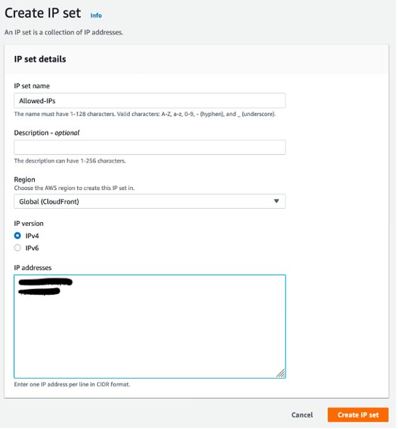
3.2 IPセット
ブロック/許可するIPアドレスのリスト。最大10,000 IP/範囲。
{
  "Name": "BlockedIPs",
  "Scope": "REGIONAL",
  "IPAddressVersion": "IPV4",
  "Addresses": [
    "192.0.2.0/24",
    "203.0.113.45/32",
    "2001:db8::/32"  // IPV6の場合
  ]
}
ルールで参照:
{
  "Name": "BlockMaliciousIPs",
  "Priority": 4,
  "Statement": {
    "IPSetReferenceStatement": {
      "ARN": "arn:aws:wafv2:us-east-1:123456789012:regional/ipset/BlockedIPs/xxxxx"
    }
  },
  "Action": {
    "Block": {}
  },
  "VisibilityConfig": {
    "SampledRequestsEnabled": true,
    "CloudWatchMetricsEnabled": true,
    "MetricName": "BlockMaliciousIPs"
  }
}制約: IPセット作成後はスコープ(REGIONAL vs CLOUDFRONT)変更不可。
4. ラベリングと条件付きアクション
WAF v2の高度な機能。ルールが付与するラベルに基づいて、後続ルールで条件付きアクションを実行。
{
  "Name": "AttachLabel",
  "Priority": 0,
  "Statement": {
    "ByteMatchStatement": {
      "FieldToMatch": { "UriPath": {} },
      "TextTransformation": [{ "Priority": 0, "Type": "LOWERCASE" }],
      "PositionalCharacter": "EXACTLY",
      "SearchString": "/admin",
      "MatchOperator": "STARTS_WITH"
    }
  },
  "Action": {
    "Block": {}
  },
  "Labels": [
    {
      "Name": "admin_path"  // ラベル付与
    }
  ],
  "VisibilityConfig": {
    "SampledRequestsEnabled": true,
    "CloudWatchMetricsEnabled": true,
    "MetricName": "AttachLabel"
  }
}
後続ルールでラベルをチェック:
{
  "Name": "ConditionalRule",
  "Priority": 1,
  "Statement": {
    "AndStatement": {
      "Statements": [
        {
          "LabelMatchStatement": {
            "Scope": "LABEL",
            "Key": "admin_path",
            "Operator": "EQUALS"
          }
        },
        {
          "SqliMatchStatement": {
            "FieldToMatch": { "QueryString": {} },
            "TextTransformation": [{ "Priority": 0, "Type": "URL_DECODE" }],
            "SensitivityLevel": "HIGH"
          }
        }
      ]
    }
  },
  "Action": {
    "Block": {}
  },
  "VisibilityConfig": {
    "SampledRequestsEnabled": true,
    "CloudWatchMetricsEnabled": true,
    "MetricName": "ConditionalRule"
  }
}ユースケース: /admin パスの場合だけSQLiチェックを厳格にするなど、きめ細かいポリシー設計が可能。
5. WAFのアクション詳解
5.1 主要アクション
| アクション | 説明 | ユースケース | ログ記録 |
|---|---|---|---|
| Allow | リクエスト許可 | 信頼できるIP | ○ |
| Block | HTTP 403応答 | 攻撃検出 | ○ |
| Count | ログのみ記録 | デバッグ/テスト | ○ |
| CAPTCHA | チャレンジ表示 | ボット判定 | ○ |
| Challenge | 同上(非推奨) | 古い実装 | ○ |
5.2 カスタムレスポンス
ブロック時にカスタムなHTTPレスポンスを返す:
{
  "Action": {
    "Block": {
      "CustomResponse": {
        "ResponseCode": 403,
        "CustomResponseBodyKey": "custom-error",
        "ResponseHeaders": [
          {
            "Name": "X-Custom-Header",
            "Value": "Request was blocked by WAF"
          }
        ]
      }
    }
  }
}
事前にCustomResponseBodyを定義:
{
  "Name": "MyWebACL",
  "CustomResponseBodies": {
    "custom-error": {
      "ContentType": "APPLICATION_JSON",
      "Content": "{\"error\": \"Access denied\"}"
    }
  }
}
5.3 CAPTCHAのフロー
ブラウザ
  ↓
WAF(CAPTCHA判定)
  ↓
チャレンジページ表示
  ↓
ユーザーチャレンジ解答
  ↓
CAPTCHA検証(署名チェック)
  ↓
✓ Allow / ✗ Block制約: CAPTCHA対応リソースはCloudFront, ALB, API Gatewayのみ。AppSyncは非対応。
6. Bot Control(ボット対策)
6.1 Bot Controlの概要
ボットトラフィックを検出・制御。AWSマネージドボットリストに基づく判定。
{
  "Name": "BotControlRule",
  "Priority": 5,
  "Statement": {
    "ManagedRuleGroupStatement": {
      "VendorName": "AWS",
      "Name": "AWSManagedRulesBotControlRuleSet"
    }
  },
  "OverrideAction": {
    "None": {}  // Countモードで開始
  },
  "VisibilityConfig": {
    "SampledRequestsEnabled": true,
    "CloudWatchMetricsEnabled": true,
    "MetricName": "BotControlRule"
  }
}
Bot Control が検出できる主要ボット:
- 既知の悪いボット: スクレイパー、プロキシ、スキャナー
- 既知の良いボット: GoogleBot、BingBot(Amazon IP Reputationで管理)
- シグナルベース: ユーザーエージェント、TLS指紋、リクエストパターン
6.2 ボット検出ロジック
ボットスコア: 0〜1の値でボット確率を示す。
{
  "Name": "BlockHighBotScore",
  "Priority": 6,
  "Statement": {
    "AndStatement": {
      "Statements": [
        {
          "ManagedRuleGroupStatement": {
            "VendorName": "AWS",
            "Name": "AWSManagedRulesBotControlRuleSet",
            "ManagedRuleGroupConfigs": [
              {
                "AWSManagedRulesBotControlRuleSetConfig": {
                  "InspectionLevel": "TRANSACTIONAL"  // または COMMON
                }
              }
            ]
          }
        },
        {
          "LabelMatchStatement": {
            "Scope": "LABEL",
            "Key": "awswaf:bot_control:bot:category:bot",
            "Operator": "EQUALS"
          }
        }
      ]
    }
  },
  "Action": {
    "Block": {}
  },
  "VisibilityConfig": {
    "SampledRequestsEnabled": true,
    "CloudWatchMetricsEnabled": true,
    "MetricName": "BlockHighBotScore"
  }
}InspectionLevel:
COMMON: 高速判定(スコア精度やや低)TRANSACTIONAL: 高精度判定(レイテンシ増加)
7. ATP(Account Takeover Prevention)
7.1 ATP概要
認証フローの異常を検出し、アカウント乗っ取りを防止。
{
  "Name": "ATPRule",
  "Priority": 7,
  "Statement": {
    "ManagedRuleGroupStatement": {
      "VendorName": "AWS",
      "Name": "AWSManagedRulesAccountTakeoverPreventionRuleSet",
      "ManagedRuleGroupConfigs": [
        {
          "AWSManagedRulesAccountTakeoverPreventionRuleSetConfig": {
            "LoginPath": "/login",
            "RegistrationPath": "/register",
            "RequestInspection": {
              "UsernameField": {
                "Identifier": "username"  // POSTパラメータ名
              },
              "PasswordField": {
                "Identifier": "password"
              }
            }
          }
        }
      ]
    }
  },
  "OverrideAction": {
    "None": {}
  },
  "VisibilityConfig": {
    "SampledRequestsEnabled": true,
    "CloudWatchMetricsEnabled": true,
    "MetricName": "ATPRule"
  }
}ATP検出シグナル:
- 異常ログイン: 新規IP、新規地域、短時間の連続ログイン失敗
- クレデンシャル脱出: 漏洩したパスワードリストとのマッチング
- 異常登録: 大量登録、疑わしい登録パターン
制約: ATP対応リソースはALB, API Gateway, AppSync, Cognito User Pool のみ。
8. WAFログ設定と监控
8.1 ログ送信先の設定
WAFはログを3種類の送信先に対応:
CloudWatch Logs へ送信
aws wafv2 put-logging-configuration \
  --logging-configuration \
    ResourceArn=arn:aws:wafv2:us-east-1:123456789012:regional/webacl/MyWebACL/xxxxx,\
    LogDestinationConfigs=arn:aws:logs:us-east-1:123456789012:log-group:/aws/waf/my-app:* \
--region us-east-1ログフォーマット例:
{
  "timestamp": 1619000000000,
  "flowLogStatus": "OK",
  "action": "BLOCK",
  "httpsourcename": "ALB",
  "terminatingRuleId": "BlockSQLInjection",
  "httpsourceip": "203.0.113.45",
  "httpmethod": "POST",
  "httpuri": "/api/users?id=1' OR '1'='1",
  "httprequestsize": 456,
  "httpresponsecode": 403,
  "labels": [
    { "name": "awswaf:managed:aws:core:rule:SQLi_BODY" }
  ]
}
S3 へ送信
aws wafv2 put-logging-configuration \
  --logging-configuration \
    ResourceArn=arn:aws:wafv2:us-east-1:123456789012:regional/webacl/MyWebACL/xxxxx,\
    LogDestinationConfigs=arn:aws:s3:::my-waf-logs/waf-logs \
--region us-east-1メリット: 長期保存、アーカイブ分析に最適。
Kinesis Data Firehose へ送信
aws wafv2 put-logging-configuration \
  --logging-configuration \
    ResourceArn=arn:aws:wafv2:us-east-1:123456789012:regional/webacl/MyWebACL/xxxxx,\
    LogDestinationConfigs=arn:aws:kinesisfirehose:us-east-1:123456789012:deliverystream/WAFLogsStream \
--region us-east-1メリット: リアルタイム処理、ダウンストリームへのストリーミング。
8.2 ロギング設定時の考慮事項
{
  "Name": "MyWebACL",
  "LoggingConfiguration": {
    "ResourceArn": "arn:aws:wafv2:us-east-1:123456789012:regional/webacl/MyWebACL/xxxxx",
    "LogDestinationConfigs": [
      "arn:aws:logs:us-east-1:123456789012:log-group:/aws/waf/my-app:*"
    ],
    "RedactedFields": [
      {
        "SingleHeader": {
          "Name": "authorization"  // ログから除外
        }
      },
      {
        "SingleHeader": {
          "Name": "cookie"
        }
      },
      {
        "Body": {}
      }
    ],
    "LoggingFilter": {
      "DefaultBehavior": "KEEP",
      "Filters": [
        {
          "Behavior": "DROP",
          "Condition": {
            "ActionCondition": {
              "Action": "ALLOW"  // ALLOWされたリクエストはログ記録しない
            }
          },
          "Requirement": "MEETS_ALL"
        }
      ]
    }
  }
}LoggingFilter: BLOCKされたリクエストのみログ記録するなど、ログ量最適化に活用。
9. Web ACL最適化:WCU(Web ACL Capacity Units)
9.1 WCUとは
Web ACLのルール複雑度を示す単位。各ルールはWCUを消費します。
| ルール種別 | WCU消費量 | 説明 |
|---|---|---|
| マネージドルール(単純) | 20 | ほぼのAWSマネージドルール |
| マネージドルール(複雑) | 100+ | Bot Control, ATP等 |
| カスタムルール(単純) | 1 | ByteMatch等の単純マッチ |
| カスタムルール(複雑) | 30+ | 複数条件のAnd/Or等 |
| レートベースルール | 20 | RateBasedStatement |
最大WCU: デフォルト1500(増加申請可)
9.2 WCU削減戦略
{
  "Rules": [
    {
      "Name": "OptimizedRule",
      "Priority": 0,
      "Statement": {
        // ❌ 複雑(WCU多)
        // "OrStatement": {
        //   "Statements": [
        //     { "SqliMatchStatement": { ... } },
        //     { "XssMatchStatement": { ... } },
        //     { "LfiMatchStatement": { ... } }
        //   ]
        // }

        // ✓ シンプル(WCU削減)
        "ManagedRuleGroupStatement": {
          "VendorName": "AWS",
          "Name": "AWSManagedRulesCommonRuleSet"
        }
      }
    }
  ]
}ベストプラクティス:
- マネージドルールを優先(AWSが最適化済み)
- 必要最小限のカスタムルールのみ
- Or条件より And条件を優先
10. Shield Standard vs Shield Advanced
10.1 機能比較表
| 機能 | Shield Standard | Shield Advanced | 備考 |
|---|---|---|---|
| DDoS保護(L3/L4) | ✓ | ✓ | Layer 3/4 DDoS |
| 自動軽減 | ✓ | ✓ | 自動スケール |
| コスト | 無料 | $3,000/月 | + データ転送料 |
| DRT支援 | ✗ | ✓ | DDoS Response Team |
| プロアクティブエンゲージメント | ✗ | ✓ | AWS側からの提案 |
| コスト保護 | ✗ | ✓ | DDoS中の突発費用カバー |
| 攻撃サマリーレポート | ✗ | ✓ | 詳細な攻撃分析 |
| WAF統合 | ✓ | ✓ | L7防御 |
| ボトルネック検出 | ✗ | ✓ | 自動キャパシティ調整提案 |
10.2 Shield Advanced の DRT(DDoS Response Team)
Shield Advanced 契約時、AWAのセキュリティチーム(DRT)がサポート:
攻撃発生
  ↓
DRTに連絡(AWS Supportチケット)
  ↓
リアルタイムで攻撃分析
  ↓
WAFルール提案・実装支援
  ↓
攻撃を最小限に軽減DRTが提供するもの:
- 攻撃中のリアルタイムコンサルテーション
- WAF/Shield設定提案
- 攻撃後の詳細レポート
- ドメイン名の登録(保護対象明示)
10.3 コスト保護(Cost Protection)
Shield Advanced契約時、DDoS攻撃中の突発的なAWS課金(データ転送量増加等)をカバー。
例:
- 通常: CloudFront データ転送 $0.085/GB
- DDoS攻撃で100TB転送 → 通常なら$8,500
- Shield Advanced契約 → AWSが負担
制約: コスト保護はShield Advanced特定リソースのみ(CloudFront, ALB, NLB等)。
11. AWS WAF Firewall Manager 統合
11.1 Firewall Manager概要
複数AWSアカウント・地域のWAF、Shield、セキュリティグループを一元管理。
Organizations(ルートアカウント)
  ├─ Account A(本番)
  │  ├─ Region us-east-1(ALB + WAF)
  │  └─ Region eu-west-1(CloudFront + WAF)
  ├─ Account B(ステージング)
  │  └─ Region us-east-1(ALB + WAF)
  └─ Account C(開発)
     └─ Region ap-northeast-1(API GW + WAF)
        ↓
   Firewall Manager ポリシー(一元管理)
   - Web ACL配信
   - Shield Advanced有効化
   - セキュリティグループ管理
11.2 ポリシー作成フロー
# 1. ポリシー作成(マネージメントアカウント)
aws fms put-policy \
  --policy '{
    "PolicyName": "GlobalWAFPolicy",
    "PolicyDetails": {
      "PolicyType": "WAF",
      "ResourceType": "APPLICATION_LOAD_BALANCER",
      "SecurityServicePolicyData": {
        "Type": "WAF",
        "ManagedServiceData": "{\"type\": \"WAF\", \"ruleGroups\": []}"
      }
    },
    "ResourceTags": [
      {
        "Key": "Environment",
        "Value": "Production"
      }
    ]
  }'

# 2. ポリシー自動適用(全メンバーアカウント)
# フィルター条件に基づいてALBに自動適用
11.3 Firewall Manager 対応リソース
| リソース | ポリシータイプ | 説明 |
|---|---|---|
| ALB | WAF | ルールグループ配信 |
| CloudFront | WAF | Web ACL配信 |
| API Gateway | WAF | Web ACL配信 |
| その他 | Shield | DDoS保護有効化 |
| EC2/RDS等 | セキュリティグループ | ルール一元管理 |
利点:
- 組織全体のセキュリティポスチャ統一
- 新アカウント・リソース作成時の自動適用
- ポリシー違反検知・修復
12. 試験で狙われるポイント
12.1 ルール評価順序
❌ 誤解: 全ルールが並列評価される
✓ 正解: Priority 0から順に評価。最初マッチで停止実装例:
[
  { "Priority": 0, "Name": "IPWhitelist", "Action": "Allow" },
  { "Priority": 10, "Name": "BlockSQLi", "Action": "Block" },
  { "Priority": 20, "Name": "Count", "Action": "Count" }
]
→ IPWhitelistで許可されたら、後続ルールは評価されない
12.2 TextTransformation の順序
❌ 誤解: 変換順序は無関係
✓ 正解: Priority順に上から適用。順序で結果変化例:
リクエスト: "%3Cscript%3E"
┌─ Priority 0: URL_DECODE
│  → "<script>"
├─ Priority 1: HTML_ENTITY_DECODE
│  → "<script>"(変化なし)
└─ 検査対象: "<script>" ← XSS検出
12.3 マネージドルール の制約
誤解: マネージドルール内ルールの個別ブロック不可
正解: ExcludedRules で特定ルール除外可能
12.4 レートベースルール の集計
誤解: グローバル集計
正解: AggregateKeyType に基づいて集計
| AggregateKeyType | 集計単位 |
|---|---|
| IP | ソースIP単位 |
| FORWARDED_IP | X-Forwarded-For単位 |
12.5 Bot Control のインスペクションレベル
| インスペクションレベル | 特徴 |
|---|---|
| COMMON | 高速だが精度は低め |
| TRANSACTIONAL | 高精度だがレイテンシ増加 |
試験Q: 大規模トラフィック + 精度重視 → どれ?
A: TRANSACTIONAL + ScopeDownStatement で範囲絞り
12.6 Shield Advanced のコスト保護対象
対応リソース:
- CloudFront
- ALB
- NLB
- API Gateway
- AppSync
非対応:
- Lambda(直接保護不可)
- RDS(Layer 4 DDoS不可)
13. できないこと・制約
13.1 WAFの制約
| 制約 | 説明 | 回避策 |
|---|---|---|
| L3/L4 DDoS検知 | WAFはL7のみ | Shield Standard/Advanced使用 |
| コネクション切断 | TCPリセットできない(HTTP応答のみ) | ALB/NLBレイヤーで対応 |
| Lambda直接保護 | WAFは関連付け不可 | API Gateway経由で保護 |
| カスタム応答サイズ | 4KB上限 | CloudFrontで拡張 |
| リクエストボディ実検査 | デフォルト8KB上限 | OversizeHandling設定 |
| リアルタイムルール更新 | 数秒遅延(強い一貫性) | ウォームアップ期間設け |
| アラート条件設定 | WAFネイティブなし | CloudWatch Events経由 |
13.2 Shield Standard の制約
- 人員支援なし: DRTサポートなし
- 詳細レポート: 攻撃分析レポート生成されない
- プロアクティブ提案: AWSからの改善提案なし
- コスト保護: 突発費用カバーなし
13.3 ルール評価の制約
- ショートサーキット: マッチしたら以降ルール評価されない
- WCU上限: デフォルト1500(増加申請必須)
- TextTransformation数: 最大10ステップ
14. 連携パターン
14.1 CloudFront + WAF パターン
Client
  ↓
CloudFront Edge Location
  ↓
WAF(Web ACL関連付け)
  ↓
Origin ALB/S3設定:
aws cloudfront create-distribution \
  --distribution-config '{
    "WebACLId": "arn:aws:wafv2:us-east-1:123456789012:global/webacl/MyWebACL/xxxxx"
}'メリット: グローバル分散デバッグを早期の場所で実施。
14.2 ALB + WAF パターン
Client
  ↓
ALB
  ↓
WAF(Web ACL関連付け)
  ↓
Target Groups(EC2/Lambda/固定IP)設定:
aws wafv2 associate-web-acl \
  --web-acl-arn arn:aws:wafv2:us-east-1:123456789012:regional/webacl/MyWebACL/xxxxx \
--resource-arn arn:aws:elasticloadbalancing:us-east-1:123456789012:loadbalancer/app/my-alb/50dc6c495c0c9188トポロジ: オンプレ → ALB(WAF) → ASG/Lambda
14.3 API Gateway + WAF パターン
Mobile App / 3rd Party API Client
  ↓
API Gateway + WAF
  ↓
Lambda / VPC Endpoint
Bot Control 活用例:
{
  "Name": "ProtectAPIEndpoints",
  "Priority": 0,
  "Statement": {
    "ManagedRuleGroupStatement": {
      "VendorName": "AWS",
      "Name": "AWSManagedRulesBotControlRuleSet",
      "ManagedRuleGroupConfigs": [
        {
          "AWSManagedRulesBotControlRuleSetConfig": {
            "InspectionLevel": "TRANSACTIONAL"
          }
        }
      ]
    }
  },
  "OverrideAction": {
    "None": {}
  }
}
14.4 AppSync + WAF パターン
GraphQL Client(Apollo等)
  ↓
AppSync + WAF
  ↓
DynamoDB / Lambda / RDS特殊性: GraphQLのクエリ複雑度検査(別途実装)とWAFを組み合わせ。
14.5 WAF + Cognito パターン
User
  ↓
Cognito User Pool
  ↓
ID Token 取得
  ↓
API Gateway(ID Token検証)
  ↓
WAF(追加レイヤー)運用ケース: 認証後も疑わしいリクエストパターン(SQLi等)はWAFで追加検査。
14.6 WAF + Security Hub 連携
WAF(Block イベント)
  ↓
CloudWatch Events
  ↓
Security Hub(findings記録)
  ↓
SIEM/Splunk(連携)設定例:
{
  "Name": "WAFBlockEventRule",
  "EventPattern": {
    "source": ["aws.wafv2"],
    "detail-type": ["WAF Actions"],
    "detail": {
      "action": ["BLOCK"]
    }
  },
  "Targets": [
    {
      "Arn": "arn:aws:securityhub:us-east-1:123456789012:hub/default"
    }
  ]
}
15. ベストプラクティス
15.1 段階的デプロイ(Count → Block)
Week 1-2: Count モードで動作確認
├─ ルールが誤検知していないか
├─ 正規トラフィック影響ないか
└─ ログから検証

Week 3: 本番環境でもCount継続
├─ 数日規模のデータ収集
├─ パターン分析
└─ 除外ルール確認

Week 4: 段階的Block
├─ 1ルール単位でCount→Block切り替え
├─ 各ステップで影響確認
└─ 問題あれば即ロールバック

Week 5+: 本番化CLI例:
# Count モードで開始
aws wafv2 put-web-acl \
  --name MyWebACL \
  --scope REGIONAL \
  --default-action Allow \
  --rules 'Name=BlockSQLi,Priority=0,Statement={SqliMatchStatement={...}},Action={Count={}},VisibilityConfig={...}' \
  --visibility-config '{...}'

# データ収集後、Blockへ変更
aws wafv2 put-web-acl \
  --name MyWebACL \
  --scope REGIONAL \
  --default-action Allow \
  --rules 'Name=BlockSQLi,Priority=0,Statement={SqliMatchStatement={...}},Action={Block={}},VisibilityConfig={...}' \
  --visibility-config '{...}'
15.2 ログ分析の自動化
import json
import boto3
from collections import defaultdict

logs = boto3.client('logs')

def analyze_waf_logs():
    response = logs.filter_log_events(
        logGroupName='/aws/waf/my-app',
        filterPattern='[action="BLOCK"]'
    )

    blocked_by_rule = defaultdict(int)
    blocked_by_ip = defaultdict(int)

    for event in response['events']:
        log = json.loads(event['message'])
        blocked_by_rule[log['terminatingRuleId']] += 1
        blocked_by_ip[log['httpsourceip']] += 1

    # 誤検知の多いルール特定
    for rule, count in sorted(blocked_by_rule.items(),
                             key=lambda x: x[1], reverse=True)[:5]:
        print(f"{rule}: {count} blocks")

    # 特定IPからの攻撃パターン特定
    for ip, count in sorted(blocked_by_ip.items(),
                           key=lambda x: x[1], reverse=True)[:10]:
        print(f"{ip}: {count} requests from this IP")
15.3 マネージドルール活用
{
  "Rules": [
    {
      "Name": "AWSManagedRulesCommonRuleSet",
      "Priority": 0,
      "Statement": {
        "ManagedRuleGroupStatement": {
          "VendorName": "AWS",
          "Name": "AWSManagedRulesCommonRuleSet",
          "ExcludedRules": [
            { "Name": "SizeRestrictions_BODY" }  // 独自ロジックで制御
          ],
          "RuleActionOverrides": [
            {
              "Name": "GenericRFI_BODY",
              "ActionToUse": { "Count": {} }  // 誤検知多いなら Count
            }
          ]
        }
      },
      "OverrideAction": { "None": {} }
    }
  ]
}
15.4 除外(Exceptions)の設計
{
  "Rules": [
    {
      "Name": "BlockSQLi",
      "Priority": 0,
      "Statement": {
        "AndStatement": {
          "Statements": [
            {
              "SqliMatchStatement": {
                "FieldToMatch": { "QueryString": {} },
                "TextTransformation": [{ "Priority": 0, "Type": "URL_DECODE" }],
                "SensitivityLevel": "HIGH"
              }
            },
            {
              "NotStatement": {
                "Statement": {
                  "ByteMatchStatement": {
                    "FieldToMatch": {
                      "SingleHeader": { "Name": "X-Internal-Admin" }
                    },
                    "TextTransformation": [{ "Priority": 0, "Type": "NONE" }],
                    "PositionalCharacter": "EXACTLY",
                    "SearchString": "admin-secret-key-12345",
                    "MatchOperator": "EXACTLY"
                  }
                }
              }
            }
          ]
        }
      },
      "Action": { "Block": {} }
    }
  ]
}Note: 内部管理画面はカスタムヘッダで除外する仕組み。
15.5 監視とアラート
# CloudWatch Alarm: ブロック率が異常上昇
aws cloudwatch put-metric-alarm \
  --alarm-name WAFBlockRateAnomaly \
  --alarm-description "Alert if WAF block rate exceeds 10%" \
  --metric-name BlockedRequests \
  --namespace AWS/WAFV2 \
  --statistic Sum \
  --period 300 \
  --threshold 100 \
  --comparison-operator GreaterThanThreshold \
  --evaluation-periods 2 \
  --alarm-actions arn:aws:sns:us-east-1:123456789012:alert-topic

# CloudWatch Dashboard: WAF メトリクス可視化
aws cloudwatch put-dashboard \
  --dashboard-name WAFMetrics \
  --dashboard-body '{
    "widgets": [
      {
        "type": "metric",
        "properties": {
          "metrics": [
            ["AWS/WAFV2", "AllowedRequests", {"stat": "Sum"}],
            ["...", "BlockedRequests", {"stat": "Sum"}],
            ["...", "CountedRequests", {"stat": "Sum"}]
          ],
          "period": 300,
          "stat": "Average"
        }
      }
    ]
  }'
16. 実装例:エンタープライズグレードWAF設計
{
  "Name": "EnterpriseWebACL",
  "Scope": "REGIONAL",
  "DefaultAction": {
    "Allow": {}
  },
  "Rules": [
    {
      "Name": "RateLimitRule",
      "Priority": 0,
      "Statement": {
        "RateBasedStatement": {
          "Limit": 2000,
          "AggregateKeyType": "IP",
          "ScopeDownStatement": {
            "ByteMatchStatement": {
              "FieldToMatch": { "UriPath": {} },
              "TextTransformation": [{ "Priority": 0, "Type": "LOWERCASE" }],
              "PositionalCharacter": "EXACTLY",
              "SearchString": "/api/",
              "MatchOperator": "STARTS_WITH"
            }
          }
        }
      },
      "Action": { "Block": {} }
    },
    {
      "Name": "AWSManagedRulesCommonRuleSet",
      "Priority": 10,
      "Statement": {
        "ManagedRuleGroupStatement": {
          "VendorName": "AWS",
          "Name": "AWSManagedRulesCommonRuleSet",
          "ExcludedRules": [],
          "RuleActionOverrides": []
        }
      },
      "OverrideAction": { "None": {} }
    },
    {
      "Name": "AWSManagedRulesBotControlRuleSet",
      "Priority": 20,
      "Statement": {
        "ManagedRuleGroupStatement": {
          "VendorName": "AWS",
          "Name": "AWSManagedRulesBotControlRuleSet",
          "ManagedRuleGroupConfigs": [
            {
              "AWSManagedRulesBotControlRuleSetConfig": {
                "InspectionLevel": "TRANSACTIONAL"
              }
            }
          ]
        }
      },
      "OverrideAction": { "None": {} }
    },
    {
      "Name": "AWSManagedRulesAccountTakeoverPreventionRuleSet",
      "Priority": 30,
      "Statement": {
        "ManagedRuleGroupStatement": {
          "VendorName": "AWS",
          "Name": "AWSManagedRulesAccountTakeoverPreventionRuleSet",
          "ManagedRuleGroupConfigs": [
            {
              "AWSManagedRulesAccountTakeoverPreventionRuleSetConfig": {
                "LoginPath": "/login",
                "RequestInspection": {
                  "UsernameField": { "Identifier": "username" },
                  "PasswordField": { "Identifier": "password" }
                }
              }
            }
          ]
        }
      },
      "OverrideAction": { "None": {} }
    },
    {
      "Name": "GeoBlockingRule",
      "Priority": 40,
      "Statement": {
        "GeoMatchStatement": {
          "CountryCodes": ["CN", "RU", "KP"]
        }
      },
      "Action": { "Block": {} }
    }
  ],
  "LoggingConfiguration": {
    "ResourceArn": "arn:aws:wafv2:us-east-1:123456789012:regional/webacl/EnterpriseWebACL/xxxxx",
    "LogDestinationConfigs": [
      "arn:aws:logs:us-east-1:123456789012:log-group:/aws/waf/enterprise:*"
    ],
    "RedactedFields": [
      { "SingleHeader": { "Name": "authorization" } },
      { "SingleHeader": { "Name": "cookie" } },
      { "Body": {} }
    ],
    "LoggingFilter": {
      "DefaultBehavior": "KEEP",
      "Filters": [
        {
          "Behavior": "DROP",
          "Condition": {
            "ActionCondition": { "Action": "ALLOW" }
          },
          "Requirement": "MEETS_ALL"
        }
      ]
    }
  },
  "VisibilityConfig": {
    "SampledRequestsEnabled": true,
    "CloudWatchMetricsEnabled": true,
    "MetricName": "EnterpriseWebACL"
  }
}
まとめ
AWS WAFとShieldは段階的な防御戦略を実現するための統合セキュリティソリューション:
- WAF = L7アプリケーション層の攻撃(SQLi, XSS, ボット等)を検知・防止
- Shield Standard = L3/L4 DDoS基本保護(無料)
- Shield Advanced = 高度な DDoS保護 + DRTサポート + コスト保護
- Firewall Manager = 組織全体のセキュリティ一元管理
試験では「制約を理解した上での実装」が問われます。各リソースに対応したWAFの選択、段階的デプロイ、ログ分析の自動化——これらの実践的な知識を定着させておきましょう。