Security Hub — セキュリティ基準・ASFF・集約と自動修復
Security Hubのセキュリティ基準、ASFF、クロスリージョン集約、自動修復パイプラインを徹底解説
AWS Security Hub 全体像
AWS Security Hubは、複数のAWSアカウントとリージョンにわたるセキュリティ関連の検出結果(Findings)を一元管理し、セキュリティ基準への準拠状況を監視するサービスです。単なるログ集約ではなく、複数のセキュリティスキャナーからのFindingsを標準フォーマット(ASFF)で正規化し、優先順位付け、コンプライアンス監視、自動修復を実現する統合セキュリティプラットフォームです。
試験で狙われるポイント
- ASFF(AWS Security Finding Format): すべてのFindingsは標準フォーマットで正規化される
- マルチアカウント・マルチリージョン集約: デリゲートアカウントのFindingsをアグリゲータアカウントで一元管理
- セキュリティ基準: CIS, PCI DSS, AWS基礎セキュリティ, NIST Cybersecurity Frameworkなど複数の基準に対応
- Findingsの保持期間: 90日(削除不可)
- 修復は自分で実装: Security Hubは検出と監視のみで、修復ロジックはユーザー側で実装
- Config必須: Config統合がないとインテグレーション機能が制限される
- 自動化: EventBridgeやAutomationで外部サービスと連携し修復パイプラインを構築
1. セキュリティ基準の詳細設定
1.1 対応セキュリティ基準の種類
Security Hubは複数のセキュリティ基準(Security Standards)をサポートしており、各基準に対する準拠状況を監視できます。
| 基準 | 対象 | コントロール数 | ユースケース |
|---|---|---|---|
| CIS AWS Foundations Benchmark | AWS全般 | 220+ | 最もポピュラー。一般的なセキュリティベストプラクティス |
| PCI DSS | 決済カード業界 | 70+ | PCI-DSS v3.2.1準拠が必要な組織 |
| AWS基礎セキュリティ | AWS全般 | 150+ | AWS推奨のセキュリティ基準 |
| NIST Cybersecurity Framework | 一般向け | 22 sections | NIST推奨フレームワークに対応 |
1.2 CIS AWS Foundations Benchmark の例
{
  "Standard": "CIS AWS Foundations Benchmark",
  "Controls": [
    {
      "ControlId": "1.1",
      "Title": "Ensure AWS account has multi-factor authentication (MFA) enabled for the root user",
      "SeverityRating": "CRITICAL",
      "RelatedRequirements": ["CIS.1.1"],
      "Status": "PASSED"
    },
    {
      "ControlId": "4.1",
      "Title": "Ensure no security groups allow ingress from 0.0.0.0:0 to port 22 (SSH)",
      "SeverityRating": "CRITICAL",
      "RelatedRequirements": ["CIS.4.1"],
      "Status": "FAILED",
      "FailureCount": 3
    }
  ]
}
1.3 基準の有効化・無効化
各基準はアカウント単位で有効/無効を切り替えできます。ただし初回有効化時の評価には数時間かかるため、リージョン選択時に注意が必要です。
# AWS CLIで基準を有効化
aws securityhub batch-enable-standards \
  --standards-subscription-requests \
    StandardsArn=arn:aws:securityhub:us-east-1::standards/aws-foundational-security-best-practices/v/1.0.0,\
    StandardsArn=arn:aws:securityhub:us-east-1::standards/cis-aws-foundations-benchmark/v/1.2.0

# 基準一覧を取得
aws securityhub describe-standards
試験で狙われるポイント
- 複数基準の同時監視が可能: CISとPCI DSSを同時に有効化して、異なる要件に対応
- 基準単位でコントロール無効化: リスク許容度が高い環境では特定コントロールを無効化可能
- 基準変更の影響: 基準バージョンアップ時に新しいコントロールが追加される
2. ASFF(AWS Security Finding Format)
2.1 ASFF の役割
ASFF(AWS Security Finding Format) は、すべてのセキュリティスキャナーからのFindingsを標準化するAWSの共通フォーマットです。GuardDuty、Inspector、Macie、Config、SecurityHub自身のコントロール、カスタム統合から出力されるFindingsすべてが、このフォーマットに正規化されます。
2.2 ASFF の構造
{
  "SchemaVersion": "2018-10-08",
  "Id": "arn:aws:securityhub:us-east-1:123456789012:product/123456789012/default",
  "ProductArn": "arn:aws:securityhub:us-east-1:123456789012:product/123456789012/default",
  "GeneratorId": "security-hub|cis-aws-foundations-benchmark|1.2.0|4.1",
  "AwsAccountId": "123456789012",
  "Types": [
    "Software and Configuration Checks/AWS Security Best Practices"
  ],
  "CreatedAt": "2026-04-27T10:30:00.000Z",
  "FirstObservedAt": "2026-04-27T10:30:00.000Z",
  "LastObservedAt": "2026-04-27T10:35:00.000Z",
  "UpdatedAt": "2026-04-27T10:35:00.000Z",
  "Severity": {
    "Label": "CRITICAL",
    "Normalized": 90
  },
  "Title": "Ensure no security groups allow ingress from 0.0.0.0:0 to port 22",
  "Description": "Security groups should not allow unrestricted inbound access to critical ports.",
  "Resources": [
    {
      "Type": "AwsEc2SecurityGroup",
      "Id": "arn:aws:ec2:us-east-1:123456789012:security-group/sg-12345678",
      "Partition": "aws",
      "Region": "us-east-1",
      "Details": {
        "AwsEc2SecurityGroup": {
          "GroupId": "sg-12345678",
          "GroupName": "web-sg",
          "VpcId": "vpc-12345678",
          "IpPermissions": [
            {
              "IpProtocol": "tcp",
              "FromPort": 22,
              "ToPort": 22,
              "IpRanges": [
                {
                  "CidrIp": "0.0.0.0/0"
                }
              ]
            }
          ]
        }
      }
    }
  ],
  "Compliance": {
    "Status": "FAILED",
    "RelatedRequirements": [
      "CIS AWS Foundations Benchmark v1.2.0 4.1"
    ]
  },
  "RecordState": "ACTIVE",
  "FindingState": "NEW",
  "Workflow": {
    "Status": "NEW"
  },
  "UserDefinedFields": {
    "Environment": "production",
    "CostCenter": "eng-team"
  }
}
2.3 ASFF の主要フィールド解説
| フィールド | 説明 | 試験での重要度 |
|---|---|---|
| Id | Finding の一意識別子(ARN形式) | 重要 |
| GeneratorId | このFindingを生成したスキャナーID | 重要 |
| AwsAccountId | Findingが検出されたアカウント | 必須 |
| Types | Finding の種類分類(複数可) | 重要 |
| Severity | 重要度(Normalized: 0-100の数値) | 重要 |
| Resources | 検出されたリソースの詳細(複数可) | 重要 |
| Compliance | コンプライアンスベースラインへの準拠状況 | 重要 |
| RecordState | ACTIVE/ARCHIVED(論理的な状態) | 重要 |
| FindingState | NEW/NOTIFIED/RESOLVED/SUPPRESSED | 重要 |
| Workflow.Status | NEW/NOTIFIED/RESOLVED/SUPPRESSED(ワークフロー) | 重要 |
| UserDefinedFields | カスタムメタデータ(最大50フィールド) | 便利機能 |
2.4 RecordState vs FindingState の違い
- RecordState: ACTIVE(存在)or ARCHIVED(存在しない)
- FindingState: Findingのセキュリティ状態(NEW / NOTIFIED / RESOLVED / SUPPRESSED)
例)セキュリティグループの不正ルールが削除されるまで RecordState=ACTIVE, FindingState=NEW のままです。
試験で狙われるポイント
- ASFF の標準化: 異なるスキャナーのFindingsを同じフォーマットで扱える
- Normalized Severity: 重要度を0-100の数値で統一表現
- Resources フィールド: 複数リソースが関連している場合は配列で表現
- UserDefinedFields: 最大50フィールドまで、カスタムタグやコスト配分の情報を埋め込める
3. マルチアカウント・マルチリージョン集約(デリゲートアカウント)
3.1 アグリゲータとデリゲート
大規模な組織では、複数のAWSアカウントと複数のリージョンのFindingsを一元管理する必要があります。Security Hubはこれを実現するため、以下の構成をサポートしています。
- アグリゲータアカウント: 複数アカウントのFindingsを集約するハブ(1つ選定)
- デリゲートアカウント: Findingsを送信するメンバーアカウント(複数)
- 集約リージョン: アグリゲータが指定したリージョン(複数リージョンの集約も可能)
3.2 マルチアカウント集約の構成図
[アグリゲータアカウント (us-east-1)]
├─ Findings from Account A (us-east-1, eu-west-1)
├─ Findings from Account B (us-east-1, ap-southeast-1)
└─ Findings from Account C (us-east-1, us-west-2)

[デリゲートアカウントA]
├─ Security Hub (us-east-1) → アグリゲータへ送信
└─ Security Hub (eu-west-1) → アグリゲータへ送信
3.3 マルチアカウント設定の手順
ステップ1: アグリゲータアカウント側の設定
aws securityhub create-hub \
  --region us-east-1 \
  --enable-default-standards

# 集約リージョンを登録
aws securityhub create-finding-aggregator \
  --name CentralAggregator \
  --aggregation-type ALL_REGIONS
ステップ2: デリゲートアカウント側の設定
# デリゲートアカウントでSecurity Hubを有効化
aws securityhub create-hub --region us-east-1

# アグリゲータアカウントに所属を通知
aws securityhub enable-organization-admin-account \
  --admin-account-id 111111111111  # アグリゲータのアカウントID
ステップ3: アグリゲータがメンバーを招待
# アグリゲータアカウントでメンバーを追加
aws securityhub associate-members \
  --account-details AccountId=222222222222,Email=account-b@example.com
3.4 Organizations統合による自動デリゲート
AWS Organizations を使用している場合、デリゲートアカウントを自動的に統合できます。
# Organizations統合を有効化
aws securityhub enable-organization-admin-account \
  --admin-account-id 111111111111

# 組織内のすべてのアカウントを自動デリゲート
aws securityhub register-delegated-admin \
  --admin-account-id 111111111111
試験で狙われるポイント
- 集約リージョンの選択: アグリゲータアカウントで「ALL_REGIONS」を選定するとすべてのリージョンが集約される
- デリゲートアカウント数の制限: 1つのアグリゲータあたり最大5,000メンバーまで
- 各リージョンで独立: 異なるリージョンのアグリゲータを同時構成可能(ただし通常は1つ)
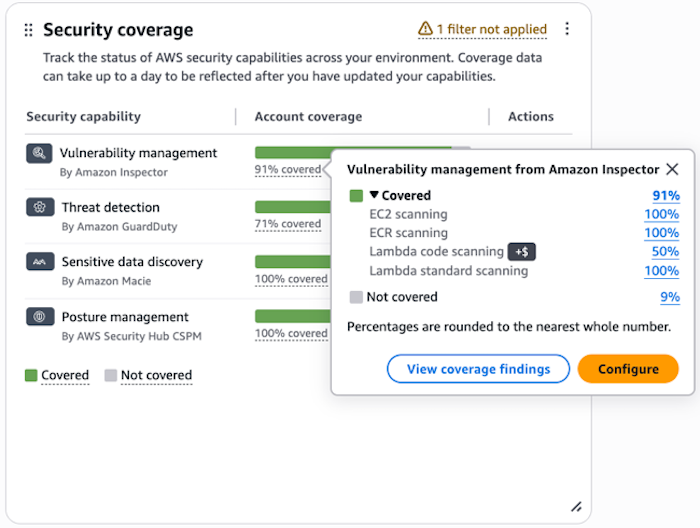
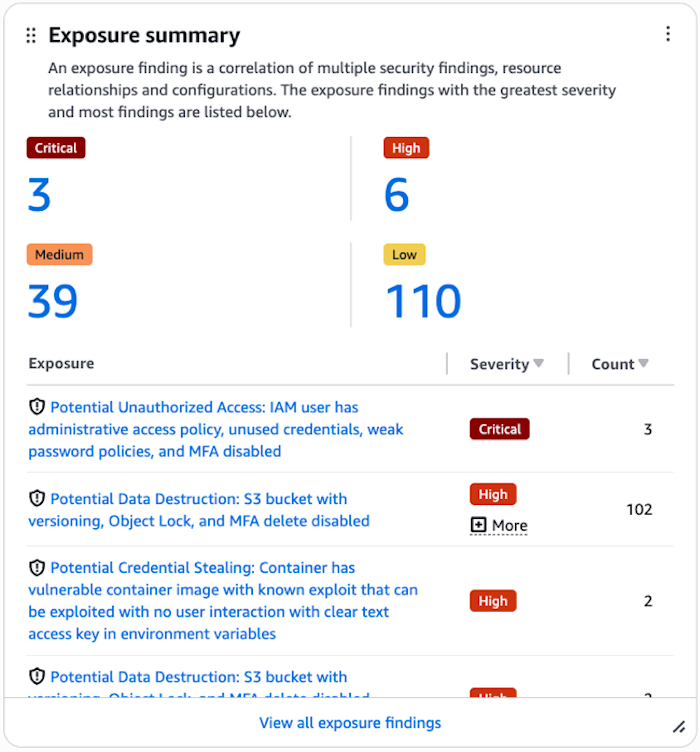
Security Hub マネジメントコンソール画面
Security Hub サービス統合フロー
Loading diagram...
4. カスタムアクションと自動修復パイプライン
4.1 カスタムアクションの設定
Security Hubのカスタムアクションは、特定のFindingに対して実行する外部ワークフロー(Lambda、SNS、Systems Manager等)を定義します。
aws securityhub create-action-target \
  --name "Remediate-OpenSecurityGroup" \
  --description "Auto-close open security group rules" \
  --identifier remediate-open-sg

# 出力例
# ActionTargetArn: arn:aws:securityhub:us-east-1:123456789012:action/custom/1234567890
4.2 EventBridge ルール による自動実行
{
  "Name": "SecurityHub-AutoRemediate",
  "EventBusName": "default",
  "EventPattern": {
    "source": ["aws.securityhub"],
    "detail-type": ["Security Hub Findings - Imported"],
    "detail": {
      "findings": {
        "Compliance": {
          "Status": ["FAILED"]
        },
        "Types": [
          "Software and Configuration Checks/AWS Security Best Practices"
        ],
        "Title": [
          {
            "prefix": "Ensure no security groups allow ingress from 0.0.0.0"
          }
        ]
      }
    }
  },
  "Targets": [
    {
      "Arn": "arn:aws:lambda:us-east-1:123456789012:function:RemediateSecurityGroup",
      "RoleArn": "arn:aws:iam::123456789012:role/EventBridgeInvokeRole",
      "RetryPolicy": {
        "MaximumEventAge": 3600,
        "MaximumRetryAttempts": 2
      }
    }
  ]
}
4.3 修復ロジックの実装例(Python Lambda)
import json
import boto3
from typing import Dict, Any

ec2 = boto3.client('ec2')
securityhub = boto3.client('securityhub')

def lambda_handler(event: Dict[str, Any], context: Any) -> Dict[str, Any]:
    """
    Security Hub Finding から指摘されたセキュリティグループの不正ルール
    を自動削除する修復ロジック
    """
    findings = event['detail']['findings']

    remediation_results = []

    for finding in findings:
        try:
            # Findingから対象リソースを抽出
            resource = finding['Resources'][0]
            sg_id = resource['Details']['AwsEc2SecurityGroup']['GroupId']

            # 不正なルールを特定(0.0.0.0/0 → SSH)
            ip_perms = resource['Details']['AwsEc2SecurityGroup']['IpPermissions']
            rules_to_remove = [
                perm for perm in ip_perms
                if perm.get('FromPort') == 22 and
                   any(cidr.get('CidrIp') == '0.0.0.0/0'
                       for cidr in perm.get('IpRanges', []))
            ]

            # 修復実行
            for rule in rules_to_remove:
                ec2.revoke_security_group_ingress(
                    GroupId=sg_id,
                    IpPermissions=[rule]
                )
                remediation_results.append({
                    'sg_id': sg_id,
                    'action': 'revoked',
                    'rule': rule
                })

            # Security Hub に修復状況を報告
            update_finding_status(
                finding_id=finding['Id'],
                status='RESOLVED',
                reason=f"Auto-remediated: {len(rules_to_remove)} rules removed"
            )

        except Exception as e:
            print(f"Remediation failed for {finding['Id']}: {str(e)}")
            update_finding_status(
                finding_id=finding['Id'],
                status='FAILED',
                reason=f"Remediation error: {str(e)}"
            )

    return {
        'statusCode': 200,
        'remediations': remediation_results
    }

def update_finding_status(finding_id: str, status: str, reason: str) -> None:
    """Security Hub の Finding ステータスを更新"""
    securityhub.batch_update_findings(
        FindingIdentifiers=[{'Id': finding_id, 'ProductArn': finding_id.rsplit('/', 1)[0]}],
        Workflow={'Status': status},
        UserDefinedFields={'RemediationReason': reason}
    )
4.4 修復の段階的導入(ドライラン)
本番環境での突然の自動修復は危険なため、段階的に導入することを推奨します。
# ステップ1: 検出のみ(アラート)
# EventBridge ルール → SNS(管理者に通知)

# ステップ2: ドライラン(修復シミュレーション)
# Lambda が修復対象を特定 → CloudWatch Logs に出力(実際には修復しない)

# ステップ3: 限定的な修復(非本番環境)
# EventBridge フィルター: Environment != 'production'

# ステップ4: 本番修復(段階的)
# EventBridge フィルター: 特定の基準のみ(CRITICAL のみ等)
試験で狙われるポイント
- カスタムアクションは実行トリガー: セキュリティ監視者が手動実行する
- 自動修復は EventBridge + Lambda: 修復ロジックはユーザーが完全に実装・テスト
- 修復失敗時の通知: SNS / Systems Manager の通知機能を組み合わせ
- 監査ログ: CloudTrail に修復実行の履歴が記録される
5. できないこと・制約
5.1 修復は自動ではなく通知のみ
重大な制約: Security Hub は検出と監視のみで、自動修復は実装されていません。
Security Hub の役割
- 検出 → 集約 → 優先順位付け → アラート
実装が必要
- 修復ロジック → 修復実行 → 修復検証 → ロールバック
修復パイプラインを構築するには、EventBridge + Lambda(またはSystems Manager)の組み合わせが必須です。
5.2 Config 統合が必須
Security Hub の以下の機能は AWS Config が必要です。
| 機能 | Config必須度 |
|---|---|
| セキュリティグループ、IAM ポリシー等の設定遵守チェック | 必須 |
| リソースのコンプライアンス状態の継続的監視 | 必須 |
| Config Custom Rules による高度なチェック | 必須 |
| CloudFormation テンプレートの検証 | 必須 |
Config なしで有効化可能な機能(GuardDuty, Macie 検出など)は動作しますが、規制要件対応には Config が実質必須です。
5.3 Findings の保持期間制限(90日)
- Findings は最大90日間保持される
- 90日経過後は自動削除(復旧不可)
- 長期保管は S3 エクスポート で実装
# S3へのエクスポート設定
aws securityhub batch-get-findings \
  --finding-identifiers '[{"ProductArn": "...", "Id": "..."}]' \
  --query 'Findings' | aws s3 cp - s3://security-findings-archive/findings-$(date +%Y%m%d).json
5.4 カスタムルールの制限
- カスタムinsights の最大数: アカウント当たり100個
- カスタムアクション: アカウント当たり50個
- バッチ操作(update_findings): 1回100件まで
5.5 API リクエストレート制限
API レート制限
- バッチ操作: 秒単位 10 requests/sec
- GetFindings: 秒単位 15 requests/sec
- その他: 秒単位 3 requests/sec
スケーリング時は AWS Support に相談してレート上昇をリクエスト。
5.6 リソースサポートの限界
Security Hub がモニタリングできるリソースは限定されています。
| リソース | サポート | 代替手段 |
|---|---|---|
| EC2 インスタンス | 一部 | GuardDuty, Inspector, Systems Manager |
| セキュリティグループ | サポート | AWS Config, VPC Flow Logs |
| IAM ポリシー | サポート | AWS Config, IAM Access Analyzer |
| Lambda 関数 | 制限的 | Inspector for Lambda |
| データベース(RDS等) | 制限的 | AWS Config, Database Activity Monitoring |
| コンテナ(ECS等) | 制限的 | Inspector for ECS, ECR |
試験で狙われるポイント
- 修復実装は必須: 「Security Hub で自動修復される」という誤解をされないこと
- Config 統合の重要性: Config なしではセキュリティグループチェックが動作しない
- 90日制限を認識: 長期監査には S3 エクスポートなど別途計画が必須
6. ユースケース別の実装戦略
6.1 コンプライアンスダッシュボード
{
  "Dashboard": {
    "Name": "Compliance-Dashboard",
    "Widgets": [
      {
        "Type": "ComplianceBar",
        "Standard": "CIS AWS Foundations Benchmark",
        "Metrics": {
          "PassedControls": 180,
          "FailedControls": 40,
          "CompliancePercentage": 81.8
        }
      },
      {
        "Type": "TrendChart",
        "Title": "Finding Trend (30 days)",
        "Data": {
          "CRITICAL": 25,
          "HIGH": 85,
          "MEDIUM": 320,
          "LOW": 1200
        }
      },
      {
        "Type": "ResourceBreakdown",
        "Title": "Most Problematic Resources",
        "Resources": [
          {"Type": "AwsEc2SecurityGroup", "FailureCount": 12},
          {"Type": "AwsIam", "FailureCount": 8},
          {"Type": "AwsS3", "FailureCount": 5}
        ]
      }
    ]
  }
}
6.2 Finding の優先順位付けと SLA
def prioritize_findings(finding: Dict) -> Dict:
    """
    Finding の優先度を計算し、対応SLAを決定
    """
    severity = finding['Severity']['Normalized']  # 0-100
    resource_type = finding['Resources'][0]['Type']
    compliance_status = finding['Compliance']['Status']

    # スコア計算
    priority_score = 0
    sla_hours = 0

    # 重要度
    if severity >= 80:
        priority_score += 40
        sla_hours = 1
    elif severity >= 60:
        priority_score += 30
        sla_hours = 4
    else:
        priority_score += 10
        sla_hours = 24

    # リソースタイプ(本番環境重視)
    if resource_type in ['AwsEc2Instance', 'AwsRds']:
        priority_score += 20
    elif resource_type in ['AwsS3', 'AwsIam']:
        priority_score += 15

    # コンプライアンス関連性
    if 'PCI DSS' in str(finding.get('Compliance', {})):
        priority_score += 25
        sla_hours = max(1, sla_hours - 12)

    return {
        'finding_id': finding['Id'],
        'priority_score': priority_score,
        'sla_hours': sla_hours,
        'action': 'IMMEDIATE' if priority_score > 70 else 'SCHEDULED'
    }
6.3 自動修復ワークフロー例(セキュリティグループ)
AutoRemediationWorkflow:
  - Phase: "Detection"
    Trigger: "Security Hub Finding - Open SSH Access"
    Action: "EventBridge captures finding"

  - Phase: "Assessment"
    Check:
      - "Is resource in production?"
      - "Is owner contact available?"
      - "Are there active sessions?"
    Condition: "All checks pass"

  - Phase: "Pre-Notification"
    Notify: "Owner email with 1-hour warning"
    Content: "Open SSH access detected. Auto-remediation in 1 hour."

  - Phase: "Remediation"
    Action: "Lambda revokes 0.0.0.0/0 → SSH rule"
    Approval: "Automatic after 1-hour window"
    Rollback: "Can be manual via AWS Console"

  - Phase: "Verification"
    Check: "Run Config again to verify"
    Action: "Update Finding state to RESOLVED"

  - Phase: "Documentation"
    Log: "CloudTrail + custom metrics to CloudWatch"
    Alert: "SNS notification of completion"
7. ベストプラクティス
7.1 全リージョン + 全アカウント有効化
#!/bin/bash
# すべてのリージョンで Security Hub を有効化するスクリプト

REGIONS=$(aws ec2 describe-regions --query 'Regions[].RegionName' --output text)
STANDARDS=(
  "arn:aws:securityhub:${REGION}::standards/aws-foundational-security-best-practices/v/1.0.0"
  "arn:aws:securityhub:${REGION}::standards/cis-aws-foundations-benchmark/v/1.2.0"
)

for REGION in $REGIONS; do
  echo "Enabling Security Hub in $REGION..."

  # Security Hub hub を作成
  aws securityhub create-hub --region $REGION 2>/dev/null || true

  # デフォルト基準を有効化
  aws securityhub batch-enable-standards \
    --region $REGION \
    --standards-subscription-requests \
      StandardsArn=arn:aws:securityhub:${REGION}::standards/aws-foundational-security-best-practices/v/1.0.0
done
7.2 Finding の状態管理戦略
┌─────────────────────────────────────────────────────────────┐
│  Finding Lifecycle                                          │
├─────────────────────────────────────────────────────────────┤
│  NEW (初検出)                                                │
│    ↓ (セキュリティチーム確認)                               │
│  NOTIFIED (チーム通知済み)                                   │
│    ↓ (修復開始)                                              │
│  IN_PROGRESS (修復中)                                         │
│    ↓ (修復完了)                                              │
│  RESOLVED (解決)                                             │
│                                                             │
│  SUPPRESSED (許容済み) → 定期的に再審査                    │
└─────────────────────────────────────────────────────────────┘
7.3 통知 구조 (Notification Architecture)
{
  "SNSTopics": {
    "Critical": {
      "Name": "security-hub-critical-findings",
      "Subscribers": ["ciso@company.com", "sec-team@company.com"],
      "Filter": "Severity.Normalized >= 80"
    },
    "High": {
      "Name": "security-hub-high-findings",
      "Subscribers": ["sec-ops@company.com"],
      "Filter": "Severity.Normalized >= 60 AND < 80"
    },
    "Weekly-Digest": {
      "Name": "security-hub-weekly-digest",
      "Subscribers": ["management@company.com"],
      "Schedule": "CRON 0 9 ? * MON *"
    }
  }
}
7.4 Finding Insights による定期レポート
# 高リスク Finding を特定
aws securityhub get-insights \
  --filters '{
    "Severity": [{
      "Comparison": "GTE",
      "Value": "80"
    }],
    "RecordState": [{
      "Comparison": "EQUALS",
      "Value": "ACTIVE"
    }]
  }' \
  --group-by-attribute RESOURCE_ID

# 過去30日のトレンド
aws securityhub get-findings \
  --filters '{
    "UpdatedAt": [{
      "DateRange": {
        "Value": 30,
        "Unit": "DAYS"
      }
    }]
  }' \
  --sort-criteria 'FieldName=UpdatedAt,SortOrder=DESC'
試験で狙われるポイント
- 段階的な修復展開: すぐに全自動化するのではなく、検出 → 通知 → ドライラン → 本番の流れ
- Finding ライフサイクル: NEW/NOTIFIED/RESOLVED の状態遷移を理解
- コスト最適化: Findings の増加に伴い、EventBridge ルール、Lambda実行、API呼び出しのコストが増加
8. 他サービスとの連携パターン
8.1 GuardDuty との連携
| 機能 | GuardDuty | Security Hub |
|---|---|---|
| 脅威検知 | ネットワーク、ホスト, DNS | 設定検証 |
| Finding出力 | GuardDuty ネイティブ | ASFF標準化 |
| 自動修復 | なし | イベントベース |
| 連携方法 | Security Hub に統合表示 | EventBridge で連動 |
{
  "GuardDutyFinding": {
    "Type": "Finding",
    "GeneratorId": "guardduty",
    "Title": "Backdoor.EC2/DenialOfService.Dns",
    "Description": "EC2 instance performing DNS queries to suspicious domains",
    "AutomationPath": "EventBridge → Systems Manager → Isolate VPC"
  }
}
8.2 Inspector との連携
{
  "EventBridgeRule": {
    "Name": "inspector-to-securityhub",
    "Source": ["aws.inspector2"],
    "DetailType": ["Inspector2 Finding"],
    "Target": {
      "Service": "Security Hub",
      "Action": "ImportFindings",
      "Format": "ASFF"
    }
  }
}
8.3 Macie との連携
# Macie が検出した個人情報を Security Hub で一元管理
import boto3

securityhub = boto3.client('securityhub')

def forward_macie_findings():
    """Macie findings を Security Hub にインポート"""
    macie = boto3.client('macie2')

    findings = macie.list_findings(
        findingCriteria={
            'criterion': {
                'severity.description': {'eq': ['High', 'Critical']}
            }
        }
    )

    # ASFF形式に変換してインポート
    asff_findings = convert_macie_to_asff(findings)

    securityhub.batch_import_findings(
        Findings=asff_findings
    )
8.4 AWS Config との連携戦略
# Config Aggregator で複数リージョン・複数アカウントの設定コンプライアンスを集約
aws configservice put-configuration-aggregator \
  --configuration-aggregator-name CrossAccountAggregator \
  --account-aggregation-sources '[{
    "AllAwsRegions": true,
    "AccountIds": ["111111111111", "222222222222"]
  }]'

# Security Hub がこのデータを読み込みコンプライアンス評価
8.5 Firewall Manager との連携
{
  "FirewallManagerPolicy": {
    "ResourceType": "EC2_SECURITY_GROUP",
    "Action": "BLOCK",
    "Compliance": "Monitor via Security Hub",
    "NonCompliantResources": "Surfaced as Security Hub Findings"
  }
}
8.6 EventBridge ルール集約戦略
# 複数のセキュリティサービスからの Findings を一つの EventBridge ルールで処理
import boto3

events = boto3.client('events')

rule_pattern = {
    "source": [
        "aws.securityhub",
        "aws.guardduty",
        "aws.inspector2",
        "aws.macie"
    ],
    "detail-type": ["Security Hub Findings - Imported"],
    "detail": {
        "severity": [80, 90, 99]  # CRITICAL のみ
    }
}

events.put_rule(
    Name='unified-security-findings',
    EventPattern=json.dumps(rule_pattern),
    State='ENABLED'
)

# Target: Lambda → Slack → PagerDuty
8.7 Organizations との統合
# 組織全体で Security Hub を統一管理
aws organizations register-delegated-admin \
  --account-id 111111111111 \
  --service-principal securityhub.amazonaws.com

# 管理アカウントで下記を実行
aws securityhub create-organization-admin-account \
  --admin-account-id 111111111111
8.8 Systems Manager との連携
{
  "SSMAutomation": {
    "Document": "RemediateSecurityGroupViolation",
    "TriggerSource": "Security Hub Finding",
    "Parameters": {
      "SecurityGroupId": "{{ Finding.Resources[0].Details.AwsEc2SecurityGroup.GroupId }}",
      "RuleToRemove": "{{ Finding.Resources[0].Details.AwsEc2SecurityGroup.IpPermissions[0] }}"
    },
    "Actions": [
      "aws:executeAwsApi - ec2:RevokeSecurityGroupIngress",
      "aws:sleep - 60",
      "aws:executeAwsApi - ec2:DescribeSecurityGroups",
      "aws:branch - Check remediation success"
    ]
  }
}
試験で狙われるポイント
- ASFF はすべてのサービスの共通言語: GuardDuty, Inspector, Macie すべてが ASFF で出力される
- 各サービスの役割分担: GuardDuty(脅威)、Inspector(脆弱性)、Macie(データ機密性)、Config(設定)
- Organizations 統合で一元管理: 複数アカウントの集約は Organizations 経由がベストプラクティス
9. 試験対策まとめ
9.1 頻出問題パターン
Q1: 複数のAWSアカウント・リージョンのFindingsを一箇所で確認したい場合、どのように構成すべきか?
A: アグリゲータアカウント + デリゲートアカウント構成
  - 管理アカウント側: create-finding-aggregator with ALL_REGIONS
  - メンバーアカウント側: Security Hub 有効化 → 親に登録
  - Organizations 統合で自動化可能
Q2: セキュリティグループの不正ルールを自動で修復したい。Security Hubで実装できるか?
A: NO. Security Hub は検出・集約のみ。
   修復は EventBridge + Lambda で実装必須。
   段階的導入(検出 → 通知 → ドライラン → 本番)を推奨
Q3: Finding を90日以上保持したい場合?
A: S3 エクスポートで実装
   - CloudWatch Events で定期的に Finding を取得
   - S3 に JSON で保存
   - Athena で分析
Q4: Config なしで Security Hub を完全に動作させたい
A: 不可能に近い。
   Config がないと以下が動作しない:
   - セキュリティグループルール検証
   - IAM ポリシー準拠チェック
   - CloudFormation テンプレート検証
9.2 よくある誤解
| 誤解 | 正解 |
|---|---|
| Security Hub が自動修復してくれる | 修復ロジックはユーザーで実装必須 |
| Findings は永続保存される | 90日で自動削除(復旧不可) |
| Config なしでも動作する | Config 統合がないと主要機能が使えない |
| 単一リージョン構成で十分 | 全リージョン + Organizations 統合推奨 |
| RecordState と FindingState は同じ | 異なる(存在 vs セキュリティ状態) |
試験出題可能性が高いトピック
- ASFF フォーマット: 特に Severity の Normalized 値(0-100)
- アグリゲータの集約リージョン選択: ALL_REGIONS vs 特定リージョン
- EventBridge フィルタリング: タイムリーで無駄のない通知設計
- 修復実装の段階: ドライラン → 限定的修復 → 本番の流れ
- 他サービス連携: GuardDuty, Inspector, Macie, Config の役割分担
参考資料
公式ドキュメント
関連サービス
更新日: 2026年4月27日
難易度: Advanced (SCS-C03)
推定学習時間: 35分